ThisProp

Educational guide · Investor workspace

Example operator workflow

How one acquisition moves through ThisProp—from list import through close, portfolio execution, and disposition. Illustrative structure based on the live product; not a customer story.

Illustrative workflow — not a case study

What this page is

A walkthrough of the investor-side operating thread ThisProp is built around: pipeline to payroll, one workspace. Use it to see where imports, underwriting, acquisitions, portfolio ops, and accounting connect—before you request early access.

Who this workflow is for

  • Owner-operators running their first deals
  • Small teams with acquisitions + VA intake
  • Operators replacing spreadsheets and disconnected tools
  • Teams who need post-close rehab, maintenance, and books in the same thread as the deal

Workflow overview

Lead → underwrite → acquire → operate → exit/refinance on one property thread.

Integrated asset management workflow diagram: Lead, Underwrite, Acquire, Operate, and Exit on one thread, with lead-generation stages grouped and a renew cycle from Exit back to Lead.

Step 1: Import and qualify leads

Bring properties in from CSV, Excel, or PDF import. Attach or enrich with data packs—ownership, equity, skip-traced contacts, valuation context—so qualification happens on the property record, not in a side spreadsheet.

  • County auction monitors can feed new leads into the same pipeline
  • Contacts stay linked to the property
  • Mobile and desktop show the same workspace state
Properties & imports

Lead list, columns, and paths from bulk import into real workspace records.

Step 2: Underwrite and stage the acquisition

Open the deal workspace: acquisition stages, notes, capital stack, rehab scope of work, budgeted vs. actual line items, auction dates when relevant.

Deal detail & capital stack

Acquisition stages, rehab scope, and funding tranches on the demo hero deal.

Step 3: Close and move into portfolio

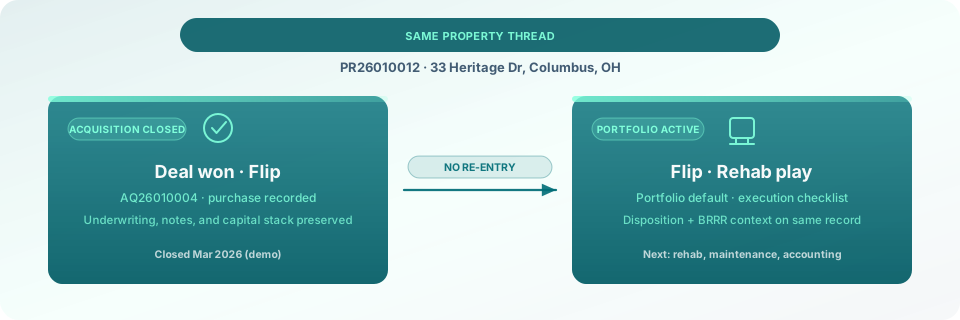
Mark the acquisition closed; execution context carries into portfolio without re-entering address or deal history.

Diagram: closed acquisition on one property thread handing off to active portfolio execution without re-entering address or deal history.

When the deal closes, ThisProp carries underwriting, notes, and capital context into portfolio on the same property record—no duplicate entry.

Step 4: Execute rehab, maintenance, and accounting

Run Business Operations: rehab and maintenance projects, work orders, rental records, timecards, client invoices with Stripe payment links, contractor coordination through the crew portal, and entity-level accounting.

  • Budgeted vs. actual visible on rehab line items
  • Vendor/crew visibility without a separate portal SKU
  • Accounting hub tied to the operating entity
Property maintenance project

Active work orders and crew coordination on a seeded demo property.

Step 5: Monitor, coordinate, and disposition

Workspace-wide county monitors, calendar, VA cadence tasks, contacts, and dispositions pipeline when you exit.

County monitoring

Scheduled county crawls and import approvals in one monitoring hub.

Roles involved

Illustrative responsibilities on a typical investor workspace — not a org chart.

Owner / Partner

Stages deals, approves underwriting, owns dispositions

VA

Property UI, cadence tasks, intake, multilingual workspace

Operations / PM

Rehab, maintenance, work orders, timecards

Accounting

Books, invoices, entity ledger

Crew / vendor

Crew portal — hours, assignments, limited property context

Systems replaced or consolidated

Illustrative before → after — no ROI claims.

  • Spreadsheet pipeline Acquisitions + portfolio thread in ThisProp
  • Detached UW model Capital stack on the deal workspace
  • Podio / Zapier glue Workspace roles + VA workflows
  • QuickBooks-only ops Accounting hub on the property thread
  • Separate crew text chains Crew portal on the property
  • County site bookmarks County monitors with digests

See it in your market

Request early access or explore day-in-the-life guides for solo operators and teams.

Get Early Access

Request early access — we reply when your wave opens.